
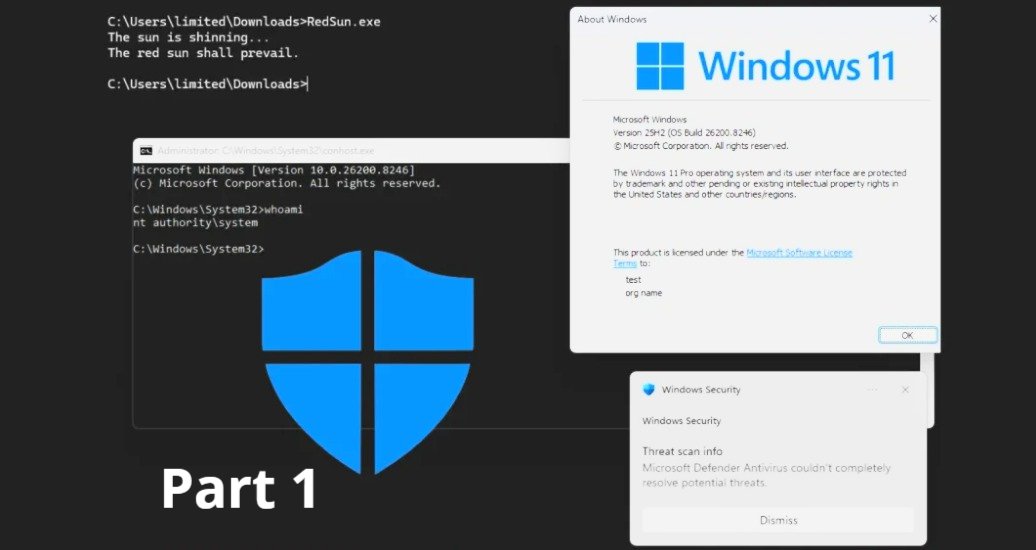
RedSun is a newly disclosed local privilege escalation technique that abuses an insecure behaviour in Windows Defender when handling “cloud-tagged” files. In practical terms, it can allow an attacker who already has low-privilege execution on a Windows device to escalate to SYSTEM on Windows 10 and Windows 11, even on systems that are otherwise fully patched. (heise.de)
This article focuses on actions enterprise SOC teams, MSPs, and MSSPs can deploy quickly to reduce risk while you wait for a vendor fix and validate longer-term hardening.
What RedSun is doing (why these mitigations make sense)
Public reporting describes RedSun as leveraging the Cloud Files API and an apparent Defender flaw. When Defender detects a malicious file with a “cloud tag,” it can rewrite the file to its original path, which can be abused to overwrite sensitive paths and escalate privileges. Additional commentary references a race condition and the placement of an executable in a system directory, leading to SYSTEM. (heise.de)
That gives defenders a clear mitigation goal: reduce the attack surface around cloud-tagged file handling, minimise high-risk remote response features until you’ve assessed exposure, and tighten endpoint rules that constrain common post-exploitation behaviour.
Treat RedSun as post-compromise elevation: patching and prevention still matter, but your fastest wins usually come from (1) limiting attacker “room to move” and (2) improving detection for the abuse path.
Immediate containment actions (first 24 hours)
Temporarily disable Live Response (if your risk assessment supports it)
If you suspect an attacker could chain RedSun with Defender for Endpoint operational features, consider temporarily disabling Live Response. At the same time, you validate your controls and confirm whether your environment is exposed.
Live Response is managed in the Microsoft Defender portal under endpoint settings and is surfaced as an advanced feature capability. (learn.microsoft.com)
Suggested approach:
- Create an emergency change record with a clear rollback condition (for example: “re-enable once Microsoft releases a fix and we’ve validated mitigations on pilot rings”).
- Disable Live Response at the tenant level (or scope it tightly if you must keep it for IR).
- Communicate clearly to IR handlers what to use instead during the window (for example: remote tooling via your EDR workflows, scripted collection via approved packages, or on-device collection for critical cases).
Live Response can be essential during active incidents. If you can’t disable it, focus on tight RBAC, conditional access, and monitoring for unusual usage patterns (especially outside normal IR hours).
Audit SAS token usage and investigation package workflows
A recurring operational weakness in many environments is long-lived or overly permissive SAS usage. Microsoft has also documented the real-world impact of accidentally exposed SAS tokens and the importance of revocation. (microsoft.com)
Why this matters here:
- If any part of your incident response pipeline relies on uploading/downloading artefacts via SAS, ensure those tokens are short-lived, least-privileged, and monitored.
- In parallel with security research and reporting, Defender for Endpoint cloud interactions and SAS-based uploads have been identified as areas that can be abused post-breach (including unusually long validity periods). (simplysecuregroup.com)
Practical SOC steps:
- Reduce SAS token expiry windows where you control generation (aim for minutes, not days).
- Remove broad permissions (avoid write/list when read will do).
- Prefer stored access policies and revocation-ready designs where feasible (especially for shared containers). (labs.withsecure.com)
- Add detections for unusual blob access patterns (new user agents, new geos, atypical hours, spikes in failed auth).
Increase friction for common post-exploitation behaviours with ASR (fast, centrally deployable)
Attack surface reduction (ASR) rules are one of the fastest levers you can pull in Microsoft-managed estates, and Microsoft documents straightforward enablement via PowerShell and enterprise management tooling. (learn.microsoft.com)
Recommended deployment pattern
- Start with a small pilot ring in Audit or Warn mode to identify business app conflicts. (learn.microsoft.com)
- Promote to Block in waves (rings), prioritising high-risk user populations and exposed endpoints.
- Monitor events and tune exclusions sparingly.
PowerShell quick commands you can adapt for emergency change
- View current ASR configuration:
Get-MpPreference - Add an ASR rule in audit mode:
Add-MpPreference -AttackSurfaceReductionRules_Ids <rule-guid> -AttackSurfaceReductionRules_Actions AuditMode - Enable an ASR rule (block):
Set-MpPreference -AttackSurfaceReductionRules_Ids <rule-guid> -AttackSurfaceReductionRules_Actions Enabled
Microsoft notes that if you manage devices with Intune, Configuration Manager, or similar, those platforms override conflicting PowerShell settings. (learn.microsoft.com)
Which ASR rules should you prioritise?
- Focus on rules that reduce untrusted executable and script execution paths, persistence tricks, and credential theft behaviour. Your exact shortlist should align to your fleet profile (servers vs users, developer endpoints, privileged workstations, etc.).
- If you’re unsure, deploy in audit mode first and let telemetry guide you. (learn.microsoft.com)
Deploy exploit protection XML for additional guardrails (and do it safely)
Exploit protection can be deployed via XML and applied quickly using PowerShell or Group Policy, and Microsoft documents both export and import workflows. (learn.microsoft.com)
Use this when:
- You need to rapidly standardise mitigations across a fleet.
- You want a reversible, auditable configuration artefact to apply in rings.
Recommended approach:
- Export a known-good baseline from a reference device.
- Adjust only what you must (avoid large, speculative jumps in system-wide mitigations).
- Pilot on a small device set, then expand.
Microsoft-documented import/export commands (use with your own file paths)
- Export exploit protection settings:
Get-ProcessMitigation -RegistryConfigFilePath C:\ExploitConfigfile.xml - Import exploit protection settings:
Set-ProcessMitigation -PolicyFilePath C:\ExploitConfigfile.xml(learn.microsoft.com)
Exploit protection can break line-of-business apps when applied aggressively. Keep the first rollout narrowly scoped, and expand only after validation.
Network monitoring: detect suspicious connections to Defender cloud endpoints
Because RedSun’s described chain involves Defender handling of cloud-tagged files and cloud-related behaviours, it’s sensible to add network visibility to Defender-related endpoints and flag anomalies such as:
- New or rare processes initiating outbound sessions to Defender cloud services.
- Unusual volumes of traffic from endpoints that don’t typically generate them (for example: servers with stable baselines).
- Traffic at odd hours following a suspicious file-write pattern.
Microsoft provides a straightforward pattern for hunting in Defender XDR using DeviceNetworkEvents queries. (learn.microsoft.com)
Practical SOC workflow:
- Build a list of Defender-related domains your environment uses (note: these are region and tenant dependent).
- Hunt in Defender XDR for
DeviceNetworkEventshitting those domains. - Send enriched results to Microsoft Sentinel and alert on deviations from baseline.
Hunting pattern you can reuse in Defender XDR / Sentinel
Use the structure Microsoft documents and swap in your own domain list:
DeviceNetworkEvents | where RemoteUrl has_any ("<DOMAIN_LIST>") | order by Timestamp desc (learn.microsoft.com)
Rapid deployment strategy for MSPs and MSSPs using Microsoft Intune
In multi-tenant operations, speed is everything, but so is blast-radius control. A pragmatic rollout pattern looks like this:
- Create a “RedSun mitigation” policy bundle
- ASR rules (pilot first, then block)
- Exploit protection XML (baseline)
- Live Response posture decision (disable or tightly scope)
- Detection content (network anomalies + endpoint behavioural signals)
- Deploy in rings across tenants
- Ring 0: your internal SOC devices and lab
- Ring 1: 5–20 endpoints per tenant (choose low-risk user groups first)
- Ring 2: wider user estate
- Ring 3: servers and specialist workloads (only after audit results are clean)
- Measure the operational impact
- ASR audit events volume
- Helpdesk tickets tied to blocked behaviours
- Time-to-triage for any RedSun-like alerts
Microsoft explicitly recommends testing ASR rules to ensure they don’t impede business operations before full enablement. (learn.microsoft.com)
Testing mitigations without breaking production
Aim for confidence, not heroics.
Recommended minimum test set:
- Standard user endpoint
- Developer endpoint (often the most sensitive to blocking)
- Shared workstation (if applicable)
- At least one “golden image” variant per OS build in use
Validation checklist:
- Confirm ASR rules are applying as expected (audit/warn/block status).
- Confirm exploit protection settings import cleanly and remain present after reboot.
- Confirm business-critical apps run normally (especially those that write to protected paths, use scripting engines, or perform self-update behaviour).
Where SecQube fits (for SOC teams who need faster triage in Sentinel)
RedSun is a good example of why SOC teams need two things at once: tight endpoint hardening and fast, consistent triage at scale.
SecQube’s cloud-native SOC platform is designed for Microsoft security environments (including Microsoft Sentinel) and uses Harvey, a focused conversational AI assistant, to speed up alert triage and incident workflows while keeping customer data within the customer environment for sovereignty. If you’re trying to roll out detections and response playbooks across multiple tenants (MSP/MSSP), operational consistency becomes a significant risk-reducing factor.
Learn more at SecQube.
Final note: Track vendor guidance daily until patched
As of 16 April 2026, reporting indicates that RedSun was still unpatched and was still working on current Windows builds in testing. (heise.de)
Until Microsoft ships a fix (and you’ve validated it in your estate), treat this as an active hardening and monitoring exercise: reduce the attack surface, tighten operational controls, and ensure your SOC can spot the tell-tale signals quickly.